HireTea

Tier S / Specialty/Premium Retail

Apple hiring guide and answer generator

Field report

What I actually saw on Apple's hiring portal (May 2026)

Apple's careers portal exposed concrete pay ranges on every sampled corporate role but held back numeric pay on the seasonal retail posting I checked. The AI/ML language was also surprisingly broad — it showed up in role families that aren't strictly ML engineering. After sampling 8 postings across retail, software, design, audio, and program management this week, three things stood out.

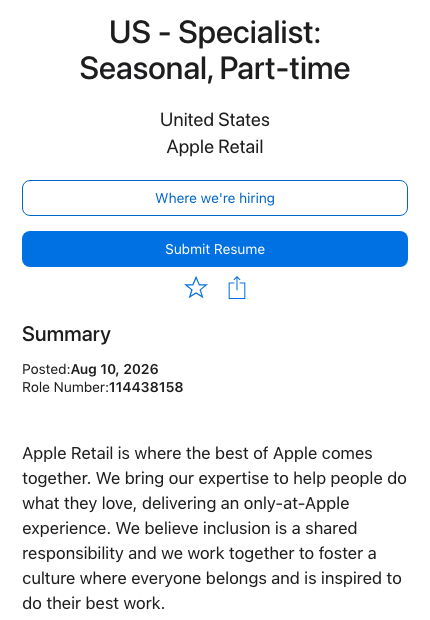
  1. Apple corporate exposed pay ranges, but seasonal retail used generic language only.Full Stack SWE Camera & Photos Tools & AI Team in Cupertino showed $147,400–$272,100. Principal Audio Engineer Production Studio Siri Speech in LA Metro showed $171,600– $302,200. Drafter & Designer Office Furniture Supplies in Milpitas showed $37.18– $55.74/hr. Software Engineer Core Services Apple Services Engineering in Seattle showed $139,500–$258,100. Sr SWE Data Siri Speech in Cupertino showed $147,400– $272,100. The US Specialist seasonal part-time retail posting, by contrast, only described "base pay as range-based and dependent on skills, qualifications, experience, and location" — no numeric range in the captured text. So Apple's pay transparency is corporate-side; retail seasonal stays opaque.
  2. AI/ML requirements show up across multiple role families — not only ML engineering.Sr Engineering Program Manager Customer Systems required "proficiency using Generative AI tools and LLMs for program management workflows." Principal Audio Engineer required cross-functional work with ML engineers. Sr SWE Data Siri Speech required distributed data processing tools and frameworks including Beam, Spark, Dask, and Ray. So AI/LLM fluency is becoming a baseline expectation across PM, audio engineering, and data engineering at Apple — not just classic ML roles. If you haven't worked with these tools, expect that gap to be tested.
  3. Apple uses a separate location picker for nationwide retail seasonal roles.The US Specialist seasonal part-time posting opened to a job detail page first, then on Submit Resume routed to a separate "Where would you like to work?" location picker page asking for location and zip code. Apple corporate postings, by contrast, showed weekly hours (40) and a specific city in the header. So Apple separates the "what role" and "which store" steps for retail — applicants who skip the picker get matched based on zip code rather than choosing intentionally.

One caveat I'd flag:The corporate Pay & Benefits language repeatedly named stock programs, discretionary RSUs, ESPP, education reimbursement, and discretionary bonuses/commission payments on the job page itself — but the actual eligibility depends on role. Sampled pages didn't expose interview steps or recruiter contact names, so process detail still comes from the recruiter once you apply.

Apple hiring benchmarks

HireTea derives these 4 scores from Apple's public hiring data. How they're calculated ->

Source audit

Verification coverage for Apple

Audited sources
38 38 official or regulator sources
Curated sources
9 added to this fact sheet
Claims checked
20 0 keep / 14 caveat
Last audit
2026-06-22 6 follow-up items separated

Answer generator

Get 3 ready-to-copy Apple application answers

Built for hourly and entry-level applicants: enter the role, one real experience, and your strongest fit. HireTea turns that into a resume bullet, a why-this-company answer, and a short interview answer.

Specialty/Premium Retail Uses "team member" language weekends, product launch periods, evenings

Resume bullet

Why this company

Interview answer

These are browser-only drafts. Keep them truthful, add a real location detail when you can, and verify current role requirements before submitting.

Answer copied

Tool option

Save this Apple application workflow

Once you have a Apple draft, the next risk is losing the posting, status, interview step, follow-up date, or offer detail. Teal's Job Tracker can keep the Apple role, source links, notes, and next action beside the other employers you are comparing.

Affiliate link: HireTea may earn a commission if you sign up for a paid Teal plan through this link. Editorial guidance stays independent.

Quick answer

What this Apple answer generator is tuned for

Start with the generator if you need copy-ready text fast. It is tuned for Specialty/Premium Retail roles, uses Apple worker language, and emphasizes customer empathy, product curiosity, and clear explanation.

Company language

Use team member for workers and customer for the people they serve.

Hiring focus

Apple has strong company-specific hiring signals, so this page uses its worker language, customer language, red flags, and interview themes.

Practical detail

If true, mention availability for weekends, product launch periods, evenings.

Applicant decision guide

How to use this Apple page before you apply

Start with the role, not only the brand

The safest way to use this page is to match the answer to the exact Apple role, department, location, schedule, and site instructions. A national employer can use different steps for entry roles, specialty teams, leadership openings, field work, corporate roles, or local hiring.

For this fact sheet, the role path includes Specialist, Technical Specialist, Creative, Expert, and Manager. Common department or function signals include Sales, Support, Technical Support, Creative, and Business. If your posting uses different language, treat the active posting and recruiter messages as stronger evidence than a general company overview.

Separate preparation from verification

Use the answer generator for draft wording, then use the hiring guide pages for verification. Interview and resume answers should emphasize real experience with customer empathy, product curiosity, and clear explanation; policy topics such as pay, age, background checks, screening steps, uniform, and orientation should be checked against current employer instructions.

Keep copies of the job posting, candidate portal tasks, recruiter emails, offer documents, and screening-vendor messages. Those records are the evidence you need if a posted pay range, start date, background-check step, screening instruction, or onboarding requirement changes.

Use the known limits as a checklist

HireTea lists known limitations so applicants can see where public evidence is thin. For Apple, the first known limitation is: Verify exact Apple Jobs role number, weekly hours, store/location, retail vs corporate flow, Submit Resume status, pay footer, and recruiter instructions before applying one role's facts to another.

When a page says details vary, that is a prompt to check the local source: the current posting, recruiter, HR contact, hiring manager, local operator, property contact, or screening vendor. The goal is not to make one universal answer sound certain when the employer handles the step locally or by role.

Why some pages are not linked from this hub

HireTea keeps the published guide set focused on pages with the strongest source trail and the lowest chance of policy confusion. Some role-specific screening or local-policy topics remain reachable by direct link only until they have stronger source support.

That does not mean the topic is unimportant. It means applicants should treat the current posting, offer packet, recruiter message, local HR contact, and official screening or onboarding vendor as the controlling source before making a decision.

Role and policy checkpoints

What to verify for Apple

Checkpoint How to use this guide Best evidence to save
Role family Apple roles can span Specialist, Technical Specialist, Creative, Expert, and Manager. Read the exact title and department before comparing advice from another applicant. Current posting, job ID, department, and location. Common departments or functions include Sales, Support, Technical Support, Creative, and Business.
Availability Apple managers commonly screen for weekends, product launch periods, and evenings. Extra flexibility such as holiday season and flexible store schedule can help when it is true for you. Posted shift, weekend or holiday language, overnight requirements, and local manager follow-up.
Physical or site requirements Treat standing full shift as role-specific, not brand-wide. Requirements can change between front-line, support, warehouse, driving, clinical, or leadership roles. Job description, offer email, onboarding instructions, safety notes, and site-specific rules.
Assessment and interview Apple uses Apple Jobs with Apple Account profile/sign-in and Submit Resume for the application flow. Applicants may see public universal assessment not published for use exact posting and recruiter instructions, followed by Apple Retail or corporate hiring team through not publicly fixed. Candidate portal tasks, recruiter email, text messages, calendar invitation, and local hiring manager instructions.
Screening and policy topics Background-check and role-specific screening details should come from current instructions, not old comments. Not confirmed as public universal process Not confirmed as universal Offer packet, disclosure or authorization form, screening-vendor email, state law notices, and the relevant employer instructions.

Applicant fit worksheet

Decide whether this Apple role fits before you apply

A useful hiring page should help you make a decision, not just collect facts. Use this worksheet to connect the Apple guide to your schedule, work limits, interview examples, and written evidence before you spend time applying or interviewing.

Applicant question Apple signal Next step
Can I meet the schedule? Critical availability signals include weekends, product launch periods, and evenings. Bonus flexibility includes holiday season and flexible store schedule. Compare your real weekly availability with the posted shift before drafting answers or accepting an interview slot.
Can I do the work safely? Physical or site requirements include standing full shift. Requirements can change between role families even inside the same brand. Check the duties section, first-week instructions, equipment notes, and any role-specific training requirement.
What examples should I prepare? Managers commonly filter for customer empathy, product curiosity, and clear explanation. Common question themes include Describe a time you handled a difficult customer., How do you learn new technology?, and Tell me about working as part of a team.. Prepare one example for reliability, one for customer or team pressure, and one for learning a task quickly.
Which guide should I open first? In the current published guide set, the published Apple guides emphasize How to Apply, Interview Questions, Hiring Process, Pay, Career Growth, and Assessment. Open the guide that matches your immediate decision: applying, interviewing, pay, age, background, orientation, dress, uniform, benefits, or assessment.
What needs written proof? Not confirmed as public universal process Not confirmed as universal Source trail starts with Apple Retail careers page, Apple Jobs retail-store search, and Apple Specialist job posting. Save the posting, job ID, portal task, recruiter message, offer packet, and any local instruction that changes your decision.

Application evidence packet

What to save before you rely on this Apple guide

The best use of a company page is to create a small record that survives if the posting changes. Save the details below before applying, interviewing, accepting, or declining. They turn this Apple guide from general preparation into a decision record you can compare against recruiter messages, candidate-portal tasks, and onboarding instructions.

Evidence item Why it matters for Apple What to save
Posting identity A Apple application can change by title, department, location, and site owner even when the brand is the same. Posting URL, job ID, exact title, department, location, date viewed, and any closing or requisition note.
Schedule fit The strongest availability signals here are weekends, product launch periods, and evenings; extra flexibility such as holiday season and flexible store schedule helps only when it is actually sustainable. Posted shift, weekend or holiday wording, start-date note, commute constraint, school or second-job conflict, and the availability you promised.
Work requirement This fact sheet points to standing full shift. Those requirements can be different for Sales, Support, Technical Support, Creative, and Business. Lifting, standing, equipment, driving, food-safety, pharmacy, cash-handling, travel, or certification wording from the posting.
Hiring step Apple uses Apple Jobs with Apple Account profile/sign-in and Submit Resume in this fact sheet. Applicants may see public universal assessment not published for use exact posting and recruiter instructions, then Apple Retail or corporate hiring team through not publicly fixed. Portal status, assessment title, interview invite, text message, recruiter email, calendar invite, and completion confirmation.
Offer and onboarding proof Pay, orientation, screening, uniform, benefits, and first-week details are safest when they come from the written offer or onboarding task. Offer letter, pay range, payroll schedule, start date, orientation time, document list, uniform instruction, and screening-vendor message.

Source review

How to judge the strength of this Apple page

Which source should control?

For Apple, start with the active posting and candidate portal. Then compare against Apple Retail careers page, Apple Jobs retail-store search, and Apple Specialist job posting. If they conflict, use the newer role-specific instruction.

What is thin or local?

Verify exact Apple Jobs role number, weekly hours, store/location, retail vs corporate flow, Submit Resume status, pay footer, and recruiter instructions before applying one role's facts to another. Keep Apple-wide background check, drug test, dress code/interview attire, orientation, and universal assessment/interview sequence claims noindex/hold unless current official evidence is added.

What should not be overread?

Do not treat one Apple page as a guarantee for every state, store, property, department, franchise, shift, or role level. Use it to decide what to verify.

What is strong enough to reuse in an answer?

Reuse details that match your real experience and the posted work: customer empathy, product curiosity, and clear explanation. Leave out brand language you cannot connect to a specific task or customer situation.

Source-backed topics

Current facts to verify first

How to Apply

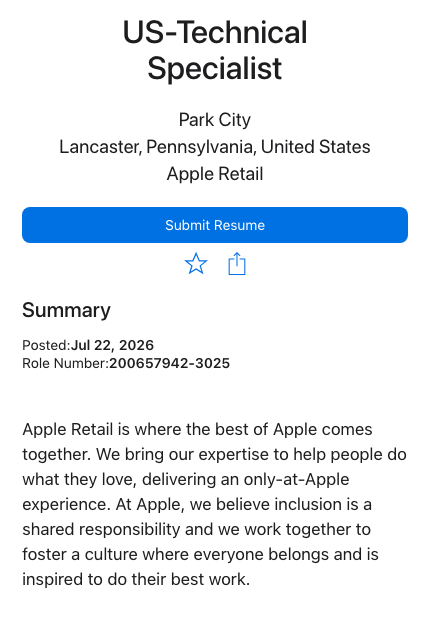
Apple Jobs uses an Apple Account profile/sign-in flow and current role pages use a Submit Resume action. Retail search cards show the job title, Apple Retail team, date posted, store/location, Role Number, and Weekly Hours; the nationwide US Specialist posting also includes a Where we're hiring location-picker path where candidates search by location or zip code. Candidates should save the exact role number, weekly-hours field, store/location choice, and job URL before applying.

Source: Apple Jobs search, profile sign-in, and retail location picker · accessed 2026-06-22

Interview Questions

For Apple Retail, official postings point interview prep toward customer discovery, plain-language product education, troubleshooting, inclusive teamwork, confidentiality, and availability for nights, weekends, and public holidays. For Apple Corporate, candidates should build examples directly from the posting's responsibilities and qualifications; current sampled corporate postings include AI tools, LLM/GenAI prototyping, agentic systems, coding agents, machine learning, data science, and on-device ML quality requirements.

Source: Apple Retail and corporate Apple Jobs postings · accessed 2026-06-22

Hiring Process

Apple's public Jobs flow should be split by role family. Retail candidates may see nationwide managed roles, store-specific roles, Role Number, Weekly Hours, Submit Resume, and a location picker for certain openings. Corporate candidates should treat the exact Apple Jobs detail page as the source of truth for team, office location, role number, weekly hours, pay footer, responsibilities, and minimum/preferred qualifications. Public official sources reviewed here did not publish a fixed interview timeline or round count.

Source: Apple Jobs retail search and official Apple Jobs detail pages · accessed 2026-06-22

Assessment

Apple's public Careers and Jobs sources reviewed on June 22, 2026 did not publish one universal assessment, test vendor, question content, completion window, or async video requirement for Apple Retail or corporate roles. The public flow shows Jobs search/profile/sign-in and Submit Resume; candidates should follow the exact Apple Jobs posting and recruiter instructions instead of preparing for a brand-wide Apple assessment that the official public pages do not document.

Source: Apple Careers, Apple Jobs search, and official Apple Jobs detail pages · accessed 2026-06-22

Career Growth

Apple Retail's official page says team members receive training, growth support, coaching, and customized development plans, and it maps Apple Store work across roles such as Specialist, Technical Specialist, Creative, Genius, Business Expert, and Manager. Current postings reinforce role-specific paths from customer discovery and technical support to Genius Bar mentorship and retail leadership.

Source: Apple Retail careers page and Apple Jobs retail postings · accessed 2026-06-22

Hiring guide

How to Apply

Source-aware notes for Apple application, with role/location caveats and verification points.

Hiring guide

Interview Questions

Source-aware notes for Apple interview questions, with role/location caveats and verification points.

Hiring guide

Hiring Process

Source-aware notes for Apple hiring process, with role/location caveats and verification points.

Hiring guide

Pay

Source-aware notes for Apple starting pay, with role/location caveats and verification points.

Hiring guide

Career Growth

Source-aware notes for Apple promotion career path, with role/location caveats and verification points.

Hiring guide

Assessment

Source-aware notes for Apple assessment, with role/location caveats and verification points.

Hiring guide

Tuition Benefits

Source-aware notes for Apple tuition benefits, with role/location caveats and verification points.

Company hiring signals

What this answer generator is based on

Worker Language

Use team member for workers and customer for customers.

Hiring Funnel

Apple Jobs with Apple Account profile/sign-in and Submit Resume; typical timeline: varies by retail/corporate role; no fixed public timeline found.

Manager Filters

  • customer empathy
  • product curiosity
  • clear explanation
  • teamwork
  • composure

Interview Questions

  • Describe a time you handled a difficult customer.
  • How do you learn new technology?
  • Tell me about working as part of a team.

Angles That Work

  • helping customers learn
  • product education
  • inclusive store experience
  • practical tech curiosity

Last Updated

2026-06-22

Known Limitations

Verify exact Apple Jobs role number, weekly hours, store/location, retail vs corporate flow, Submit Resume status, pay footer, and recruiter instructions before applying one role's facts to another.

Update history

What changed in this Apple review

Review notes

  • 2026-06-22: Fact-sheet refresh covered Apple's role path, application platform, interview signals, and source-backed hiring-policy notes.
  • 2026-06-22: Source review checked public sources accessed through 2026-06-22, 2026-05-24, and 2026-05-11 and kept the hub focused on applicant guidance rather than pages without enough source support.
  • 2026-06-22: Highlighted source-backed topic cards for How to Apply, Interview Questions, Hiring Process, and Assessment.
  • 2026-06-22: Rechecked the first known limitation: Verify exact Apple Jobs role number, weekly hours, store/location, retail vs corporate flow, Submit Resume status, pay footer, and recruiter instructions before applying one role's facts to another.